stuff(winkyy~

I have but one purpose in this life, seeking the nature of the world.

What’s the diff coverage check?

Unlike code coverage checks, which are integrated into most modern CI/CD systems, diff coverage can be a bit more complex. Diff coverage compares the code coverage of the current pull request against the target branch’s coverage, offering a fairer assessment than just looking at overall coverage. Imagine this scenario: your team enforces a rule that blocks PRs from being merged if they reduce overall code coverage below 70%. You’ve worked hard for a week to bring the coverage up to 90% and are ready to take a well-deserved vacation. But when you return two weeks later, coverage has dropped back to 70%! While you were away, your teammates didn’t have to write unit tests, thanks to the buffer your hard work created. Worse yet, those untested changes might even cause issues in production. It’s a frustrating situation!

This is where diff coverage comes in. It ensures that each PR covers its changed lines, at a level you decide is appropriate. Unfortunately, I haven’t seen many CI/CD systems with this feature built-in. Azure DevOps does support it for C# projects, though.

In this post, I’d like to share my approach to implementing this mechanism for a JavaScript project on GitHub. The same ideas can be applied to other programming languages or CI/CD systems as well.

Build the diff coverage check mechanism

Demo

Here is the demo repo https://github.com/test3207/DiffCoverageDemo

And this is the effect achieved:

Example fail PR
Example success PR

In these two PRs, I added a new function, the difference is that I didn’t write the unit tests for the first PR, thus it fails to merge.

The project structure

.github/workflows
|-main.yml
|-pull_request.yml
.pipelines
|-main.yml
|-pull_request.yml
.gitignore
index.js
index.test.js
jest.config.js
package.json

The whole structure of this repo is quite easy, as this is just a demo, so I basically created this index.js file and wrote the sum function only, and added the unit tests in index.test.js file.

The .gitignore, jest.config.js, package.json should explain themselves, as I’m using jest for unit test and related coverage check.

You can ignore .pipelines folder, as I tried to implement the whole demo on Azure DevOps in the first place, yet I found they don’t really grant any free pipeline resources easily. So what matters here is the .github/workflows folder only.
[Updated] Azure DevOps gave me the permissions to create one free pipeline. So far you still don’t need to check the .pipelines folder. I will add some context later when we go through the GitHub Actions.

The key implementation

As mentioned, the diff coverage compares diff between target branch and current branch, so the first thing we need to know, is the coverage of target branch, which is the “main” branch here in this demo.

So for this main.yml workflow:

1
2
3
4
5
6
7
8
9
10
11
12
13
14
jobs:
check-coverage:
runs-on: ubuntu-latest
steps:
- uses: actions/checkout@v4
- name: Install dependencies
run: npm install
- name: Run tests
run: npm run test
- name: Publish code coverage
uses: actions/upload-artifact@v4
with:
name: coverage
path: coverage/cobertura-coverage.xml

It generates a coverage report every time the main branch changed. It will publish the coverage report to artifact, so we can use it later when we start to compare.

Tip: We can either generate the coverage report on main branch, or each time when we create the pull request. It may takes a similar cost when the project is small, but when the project become bigger and bigger, run the unit tests for main branch can cost much more (yep, I mean both money and time).

Tip: If you don’t really know what some tasks mean here, you can copy the uses part and search it. Most of them are GitHub Actions in marketplace. They are well documented.

Now for the compare step, let’s dive into pull_request.yml workflow:

1
2
3
4
5
6
7
8
9
10
11
12
13
14
15
16
17
18
19
20
21
22
23
24
25
26
27
28
29
30
31
32
33
34
35
36
37
38
39
40
41
42
43
44
45
46
47
48
49
50
51
52
53
54
55
56
57
58
59
60
61
62
63
64
65
66
67
68
69
70
71
72
73
74
75
76
77
78
79
80
81
82
83
84
85
86
87
88
jobs:
check-diff-coverage:
runs-on: ubuntu-latest
steps:
- uses: actions/setup-node@v4
with:
node-version: 20.x
- uses: actions/checkout@v4
with:
path: current
- name: Install dependencies
run: npm install
working-directory: current
- name: Run tests
run: npm run test
working-directory: current

- uses: actions/checkout@v4
with:
ref: main
path: main
- name: Get the latest run_id of the main branch's code coverage
id: get_run_id
run: |
run_id=$(curl -s -H "Accept: application/vnd.github.v3+json" -H "Authorization: Bearer ${{ secrets.GITHUB_TOKEN }}" https://api.github.com/repos/$GITHUB_REPOSITORY/actions/runs?branch=main | jq -r '.workflow_runs[0].id')
echo run_id=$run_id >> $GITHUB_OUTPUT
- name: Download code coverage report from main branch
uses: actions/download-artifact@v4
with:
name: coverage
run-id: ${{ steps.get_run_id.outputs.run_id }}
github-token: ${{ github.token }}
- name: Put main branch's code coverage report to main folder
run: mkdir main/coverage && mv cobertura-coverage.xml main/coverage/cobertura-coverage.xml

- name: Install pycobertura
run: pip install pycobertura
- name: Generate diff coverage file
run: |
pycobertura diff main/coverage/cobertura-coverage.xml current/coverage/cobertura-coverage.xml --source1 main --source2 current --format json --output diff-coverage.json || echo "exit code $?"
- name: Publish diff coverage
uses: actions/upload-artifact@v4
with:
name: diff-coverage
path: diff-coverage.json

# it looks like
# {
# "files": [
# {
# "Filename": "index.js",
# "Stmts": "+1",
# "Miss": "+1",
# "Cover": "-33.34%",
# "Missing": "6"
# }
# ],
# "total": {
# "Filename": "TOTAL",
# "Stmts": "+1",
# "Miss": "+1",
# "Cover": "-33.34%"
# }
# }

# if stmts is less than or equal to 0, return ok
# if miss is less than or equal to 0, return ok
# the diff coverage should be (Stmts - Miss) / Stmts
- name: Check diff coverage.
run: |
cat diff-coverage.json
Stmt=$(jq -r '.total.Stmts' diff-coverage.json)
Miss=$(jq -r '.total.Miss' diff-coverage.json)
Stmt=$(echo $Stmt | sed 's/+//')
Miss=$(echo $Miss | sed 's/+//')

if [ "$Stmt" -le 0 ] || [ "$Miss" -le 0 ]; then
echo "ok"
else
DiffCoverage=$(echo "scale=2; ($Stmt - $Miss) / $Stmt" | bc)
if [ "$(echo "$DiffCoverage < 0.8" | bc)" -eq 1 ]; then
echo "Diff coverage is less than 80%."
echo "Current diff coverage is $DiffCoverage."
exit 1
else
echo "Diff coverage is greater than 80%."
fi
fi

These code blocks are divided into four parts by blank lines.

Part one, we do some initialize work, and checkout to current branch, run the unit test, and generate the coverage report.

Part two, we download coverage report of main branch that we generated in main.yml, and checkout the main branch.

Part three, we use this pycobertura tool to generate diff report.

Part four, we check the diff coverage. If it’s lower than our limit, we fail it by using exit 1.

Tip: Don’t really set diff coverage target to 100%.

Tip: The key point this workflow can work, is that we generate two Cobertura report files, and checkout both main branch and current branch, as we need these things to generate diff check report with pycobertura. This is not the only solution, I believe you can find more solutions for your own projects with different languages and DevOps platform.

The Implementation for Azure DevOps

As mentioned, I applied a free pipeline on Azure DevOps. Unfortunately, it’s for private projects only, so I can’t show you how it will look like. You can only check the .pipelines folder for the code.

It’s not that much different from GitHub Actions. You can search azure devops build pipelines to understand how to configure. And you can search azure devops branch policy and build validation to understand how to configure diff coverage check enforcement.

Feel free to leave a comment in the demo repo if you have any questions about this section.

Improvement

To keep this post still nice and short, I won’t add any more content with codes. Just put some improvement ideas here:

Configure Status Check in GitHub

The check in the workflow is not enforced. To ensure enforcement, you need to configure “Require status checks to pass” in Rules. You can refer to GitHub document to configure.

Merge Main Before Checking

As you may notice, the result of diff coverage check in this progress can be incorrect if the current branch is not up to date to the main branch. You can either configure ask team to merge remote main once before they create a PR, or merge remote main when comparing in the workflow.

Skip Checking When No JS File Changes

You can run some git commands to check if js file changes and speed up your pipelines a little.

The end.
It’s well known that cookies are used to trace users, maintain user sessions, and support stateful features in a stateless HTTP environment.

Considering it’s part of the infrastructure, we don’t often have a chance to dig into it deeply. I recently worked on something related to cross-site requests and tried to solve some compatibility issues. Here’s what I learned.

Note: For comprehensive documentation on HTTP Cookies, refer to MDN Web Docs: HTTP Cookies and MDN Web Docs: Set-Cookie.

Some Consensus

Cookies are actually special headers in requests, which can only be set by the server side using response headers with specific rules. For example, when a user logs in successfully, the server responds with headers like:

set-cookie: __hostname=value; Path=/; Expires=Wed, 07 Jul 2021 01:42:19 GMT; HttpOnly; Secure; SameSite=Lax

By standard, the server can only set one cookie per Set-Cookie header (but can send multiple Set-Cookie headers).

With detailed information, browsers will automatically decide whether to set the cookie header and which cookies to include.

The example above represents common usage. Let’s look into the details now.

In conclusion, a common practice should look like:

1
2
3
4
5
6
7
res.setHeader('Set-Cookie', '__hostname=cookie', {
httpOnly: true,
maxAge,
path: '/',
sameSite: 'lax',
secure: true,
}));

Domain

It’s allowed to set the domain attribute to share cookies between a domain and its subdomains like xxx.com and sub.xxx.com, but we should avoid this for compatibility reasons.

In the older RFC standard, if you set xxx.com, then sub.xxx.com can’t use this cookie. If you set .xxx.com, then sub.xxx.com or anything.xxx.com can use the cookie, while xxx.com can’t.

In the newer RFC standard, the only difference is that if you set .xxx.com, xxx.com can still use this cookie.

In short, some legacy browsers may implement this differently, which may lead to unexpected bugs.

The best practice is to implement a same-domain architecture across your entire site. While implementing site-wide CDN with the same domain can be tricky, we usually host static assets on CDN, so it won’t cause issues if your CDN can’t share cookies with your main site.

Expires/MaxAge

These attributes serve the same purpose: determining how long the session should be maintained. By default, most browsers expire cookies when users close the page if neither attribute is set.

Both serve the same function, but expires uses a Date value while maxAge uses a Number (in seconds). If both are set, maxAge takes precedence. It’s better to use maxAge only, to save a few bytes in requests.

Path

An interesting aspect of this attribute is that it only narrows down the routes where cookies should be sent. We should handle this on the server side anyway, so it’s usually set to /.

HttpOnly

This should always be set to prevent client-side JavaScript access to cookies. Never trust client-side code.

Secure

This enforces HTTPS-only transmission. If you’re not using HTTPS, please do. I could write another post about the benefits, but let’s stay focused on cookies for now.

SameSite

This can be lax, strict, or none.

lax allows cookies in top-level navigations, while strict doesn’t.

none is used for cross-site requests and is only allowed when secure is also set.

Usually lax suits most situations.

Note that some legacy browsers don’t support the sameSite attribute and may fail to set cookies if it contains any sameSite attribute. It can be helpful to check the User-Agent to decide whether to use this attribute for compatibility.

Reference: MDN: SameSite cookies

Normally we use Access-Control series headers to solve CORS problems. Some websites simply use Access-Control-Allow-Origin: * to allow all requests from any origin.

Reference: MDN: Cross-Origin Resource Sharing (CORS)

This mostly happens in CDN requests, so it’s acceptable in most cases. However, if you provide services for different origin sites with cookie verification, it won’t work with wildcards. Besides, attackers could abuse your CDN if you don’t have any protection. A better choice than Access-Control-Allow-Origin: * is to maintain a whitelist. Check the origin site when the server receives a request and set a specific allow origin. For example:

1
2
3
4
5
6
7
const { origin } = req.headers;
if (!whitelist.includes(origin)) {
res.writeHead(404);
res.end();
return;
}
res.setHeader('Access-Control-Allow-Origin', origin);

Chrome supports the sameSite attribute to avoid CSRF attacks. If we want to support cross-site requests with cookies, there’s one more thing we need to consider.

Reference: MDN: Cross-Site Request Forgery (CSRF)

When configuring sameSite=none, all websites have the possibility to request your APIs, even from phishing.com. Attackers may build a very similar website to yours and mislead users into clicking dangerous buttons. Apart from that configuration, we also need to check the origin requesting these sameSite=none APIs. If it’s not in the whitelist, ignore the cookie as well.

Epilogue

You may have noticed that some websites now show a notification when you first visit their pages, allowing you to choose whether to allow cookies. Yes, people are increasingly privacy-conscious, and I believe there will be standards later to prevent large companies from collecting user information.

Cookies have existed for a long time and may be somewhat outdated. Google is trying to establish new mechanisms to prevent cookie abuse by providing specific APIs in browsers to support login, user tracking, etc. It seems promising, but the reality is that many users still use legacy browsers, which means these compatibility issues may persist for a long time.

Update (2025): Google’s Privacy Sandbox initiative has introduced several alternatives to third-party cookies, including Topics API, Protected Audience API, and Attribution Reporting API. However, adoption is still ongoing. Learn more at Privacy Sandbox.

Further Reading

Thank you for reading.

Apart from the daily discussions, I want to introduce a few practices we recently used to speed up our website.

SSL Initial Issue

Nowadays we are using Let’s Encrypt extensively, as it provides both security and free certification. It is a good choice for starters or non-profit organizations.

Usually it works fine, unless the Let’s Encrypt server is too slow.

Why are we discussing the Let’s Encrypt server? Let’s go back to their documentation:

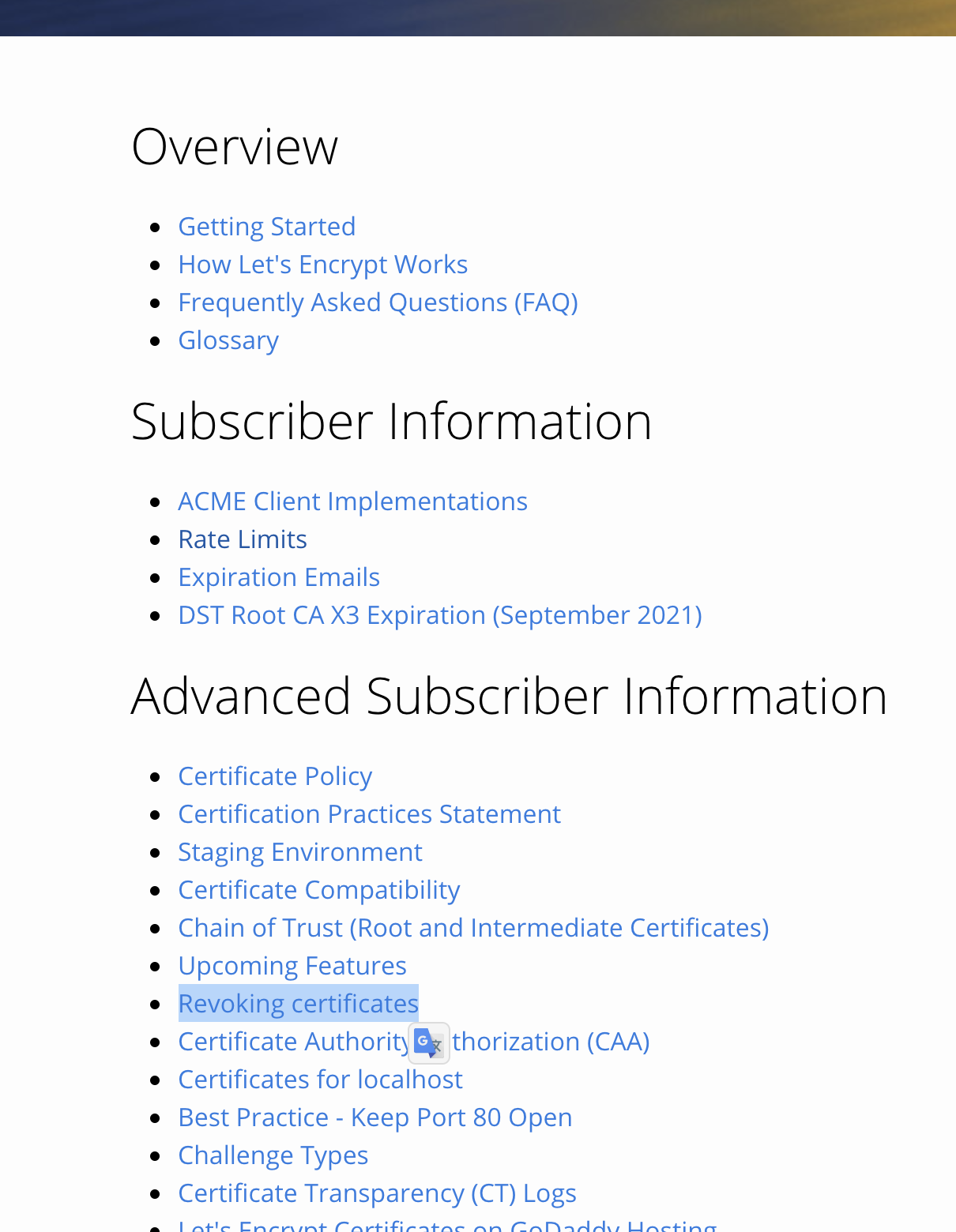
Let's Encrypt OCSP Documentation

Yes, the certificate revocation process! Users may be at risk from revoked certificates. Most modern browsers periodically check certificate validity. (This makes it difficult to reproduce: browsers only check occasionally, and it’s hard to determine whether the Let’s Encrypt server has crashed or is just slow.)

One solution is to enable OCSP Stapling on your reverse proxy server, which will pre-fetch the validation result for all clients before requests arrive.

However, your server may still experience connection issues with the Let’s Encrypt server. Occasionally, users may encounter the same problem before your server retrieves the result.

Here’s my advice: if you absolutely must ensure SSL issues never occur on your server, consider purchasing a certificate from a commercial provider. (Unfortunately, connectivity issues with these providers might also exist.)

If high availability isn’t critical, simply enable OCSP stapling. It works well most of the time.

Adaptive Size Images

Adaptive Images

This section covers more advanced optimization techniques.

We know it’s easy to resize images on the front end using HTML code like:

1
<img src = 'image/example.png' width = 400, height = 200>

This appears acceptable to users. However, browsers still download the original unoptimized images, which can exceed 20MB each!

To reduce the actual download size, we need to host different image sizes. Modern browsers support even better options! For example, Chrome supports the avif format, which is even smaller than webp. (Note: AVIF is developed by AOMedia, an alliance including Google, Apple, Mozilla, and others.)

We won’t dig into the details of each format. We chose squoosh-cli as our solution and modified it to run in browsers because:

  1. We need multiple format support with similar interfaces, making integration straightforward and providing fallbacks for older browsers

  2. It can run in browsers, enabling offline mode creation, which saves both user time and server resources

(We also support PWA, which is another optimization topic. However, it’s not a common scenario for most websites, so we won’t discuss it here.)

There are certainly more options available for achieving optimal performance, but let’s continue with this approach.

For our content server, we added a proxy layer to handle image requests. For example, when Chrome requests image_tiny.avif, the content server checks if it exists. If not, it returns the original image and starts a background process to compress the tiny version. Subsequent requests will receive the optimized image.

The size doesn’t have to be tiny — you can configure a series of image sizes based on your specific requirements. Similar optimizations can be applied to audio and video files. We use ffmpeg for media processing. However, video optimization can be complex and may involve CDN integration or more advanced techniques, which are beyond the scope of this article.

We must also protect against potential attacks. It’s essential to limit the resources available to the compression process and implement a message queue to handle traffic spikes. These precautions ensure system stability and prevent resource exhaustion.

Others

We have explored various methods to improve website performance. Some are commonly applicable and highly effective, like the techniques above. Others may have limited benefits, such as HTTP/2 Server Push (see Nginx documentation for details).

Update (2025): HTTP/2 Server Push has been deprecated by major browsers including Chrome. Modern alternatives include HTTP 103 Early Hints or resource preloading via <link rel="preload">.

Other optimizations like caching, message queues, and SQL optimization are scenario-dependent and may not be universally applicable.

I hope these insights are helpful for your performance optimization work.

Lately, some new interns sent a few merge requests to me, with tons of weird bugs. So here it comes.

TLDR

For Practice

  • In PostgreSQL, use timestamp with time zone

    • Example: ADD COLUMN created_at TIMESTAMP WITH TIME ZONE DEFAULT CURRENT_TIMESTAMP
  • In Node.js

    • Use setUTC functions such as setUTCHours to deal with Date type data
    • It’s OK to use type Date directly in prepared statements
    • It’s OK to use Date.toUTCString() in SQLs for convenience
    • Set timezone manually in cron jobs

Time Zone and Timestamp

Unix Time

  • A number like 1619141513 is a standard representation of all time types, which is the exact number of seconds passed since 1970-01-01 00:00:00 GMT
  • It’s the one and only. No need to worry about a “Chinese Unix time” thing
  • Actually it’s also the lower level of how everyone stores time-based data (but with millisecond info)
  • Notice in JS or some other modern languages/databases, Date type contains millisecond info to suit more situations, so use Math.floor(Number(new Date()) / 1000) to get a standard Unix time

Timezone

  • Say +0800 at Asia/Shanghai or +0900 at Asia/Tokyo (US uses different timezones for different states so don’t add more work)
  • It’s actually the offset info based on GMT

ISO Standard

  • A bunch of formats to show time
  • A problem is that the offset is optional
  • With an offset, we can ensure the exact same time. But without it, of course we can’t be sure

And in Conclusion

  • We can easily notice that in command line mode, we can write SQLs directly using pure strings instead of actual types (of course we can specify one for each column). There are some converters to translate strings to timestamp type.
    • Say INSERT INTO "target_table" (created_at) VALUES ('2021-05-05T06:40:36.066Z')
  • For timestamp without time zone type, the converter will ignore any timezone info
    • Say INSERT INTO "target_table" (created_at) VALUES ('2021-05-05T06:40:36.066+0800') will insert a row with 2021-05-05T06:40:36.066 as created_at column, which is actually equal to 2021-05-05T14:40:36.066+0800
  • And what’s worse, if you set a default value like now() or current_timestamp, the column will receive a timestamp based on the server physical location, and cause differences between local development environment and production environment
  • So in any cases, we don’t use timestamp without time zone just for safety
  • And for the same reason, SQL string splicing such as query(`INSERT INTO "target_table" (created_at) VALUES (${new Date()})`) is also not a good idea, because you won’t know what it will be. By default, it converts to local date string without timezone info, and leads you to the same situation above
  • So in any cases, we use (new Date()).toUTCString() or even Math.floor(Number(new Date()) / 1000) to splice SQL sentences (and in the latter case, it can solve the problem caused by using a timestamp without time zone type column in a very limited way, since it won’t help the default value problem)
  • But in the first place, SQL splicing is a very wrong idea. In most cases we should stick to prepared statements. The database dependency in Node.js will convert a Date type parameter into a timestamp with correct time zone. That’s another subject to discuss though. For some really complex, over-optimized SQL sentences, it may not be reasonable to use ORM or pure prepared statements
  • I think we should end here, since it’s still fun and ready to become boring.

Why NexusPHP Based Forum

xixixi.png

Alright in fact, some forums have a rule that if you don’t login for some days, you will be kicked out, to keep users active. Meanwhile those sites are not easy to join in.

And here in China, most of those good forums are hosted by NexusPHP. I don’t know why, the webpages are not well optimized. But here it is lol.

How to Do It

First of all, we need to find out related APIs. Luckily not much different for most sites.

Most of the sites are using Cloudflare to fight against crawlers, that should be concerned. And some of the sites are using some old-fashion captcha system to save money, while some sites should be using hCaptcha. Need to solve those problems too.

The easiest part. Just press F12 to see which APIs are they using. In fact here comes the list:

1
2
3
4
5
const defaultIndex = '/index.php'; // main page inside their websites after login
const defaultLogin = '/login.php'; // login page, not the login API
const defaultTakeLogin = '/takelogin.php'; // real login API
const defaultSignIn = ['/attendance.php', '/sign_in.php', '/show_up.php']; // sign-in API, to earn some credits everyday
const defaultCaptcha = '/image.php?action=regimage&imagehash=$HASH'; // save-money version captcha lol

Captcha

The reason why I need the login page, is that it passes CF-related-cookie and save-money version captcha imagehash.

It seems ok even if I don’t use CF-cookie, but I will still use it like real browsers do, in case of some counts-based anti-crawler rules. I just don’t really care about those rules, anyway I’m acting like a real browser, fetching a bunch of garbage too lol.

For save-money version captcha, there seems to be some kind of pattern: characters come from only 0-9A-Z, the word spacing seems to be fixed.

Again hurrah for WASM!!! Tesseract now has a Node module named tesseract.js. Using the default setting, the accuracy of tess seems not so good, with original images. But I optimized the process with the pattern I found above: chop image into single-character pieces, and use specific recognized mode: recognized as single-character in custom charlist. Here comes the repo if you want to know the detail. But I didn’t use URL as example says, instead I download image with CF-cookie first and then pass it as stream, for safety.

If you triggered hCaptcha unluckily, here comes a guide to bypass it. Basically using accessibility bug, pretending you can’t actually see anything lol.

Finally

Tada, with CF-cookie, your username, password and captchacode, and maybe user-agent in headers too for much safer concern, you can finally login without any Puppeteer stuff. After login, you will receive a bunch of cookies name cf_uid, c_secure_login, balabala. You can use it to visit index page and sign in. You don’t actually need to login every day, you can just save your cookie somewhere safe, and use it to visit index page every day before it expired.

简介

需要实现一个类似于微信小程序码的圆形码。本文记录早期调研过程和遇到的技术难点。

背景

首先研究了普通二维码的实现原理。扫描二维码时,摄像头捕捉到的图形可以不是标准正方形。识别过程是:通过边缘检测确定三个位置标识点,再根据三点共面进行矩阵变换,得到标准正方形,然后按规律解码信息点。

当然中间还有很多细节需要处理,包括边缘检测算法、矩阵变换原理及实现、冗余容错等等。考虑到已有成熟的实现方案,这里不再重复实现。

技术选型

优先考虑前端实现以支持跨平台,但全局引入 OpenCV 的 JS 包负担较大,自行实现算法难度也较高。因此先从后端实现入手。

后端可以使用 C 或 Python 实现。尝试 C 语言后发现配置复杂,最终选用了 Python。虽然所有语言的包本质上都是通过官方编译工具生成的,但官方编译指南版本较旧,因此直接使用了 pip 版本的 OpenCV。

需求的码原型图大概是:三个同心圆,最小的是实心圆用于定位,次小的透明不遮挡背景,最大的存储信息。透明圆的背景干扰是一个潜在问题,但设计目标是降低遮挡率,避免像普通二维码一样完全覆盖大片区域。

整体思路与普通二维码类似:定位点识别、矩阵变换、信息解析。

实现

第一步,定位点识别。这一步比正方形更复杂,正方形通过边缘检测可以直接识别四个顶点,再根据定位点特征匹配。圆形只能确定一个圆心。一种方案是通过定位圆上的豁口来确定方向,但缺少现成的豁口识别方法。另一种方案是直接通过模板匹配,给定一个标准摆正的目标图,比对源图和目标图的特征点,直接得出变换后的图形,可以跳过部分步骤。

第二步,矩阵变换相对简单。提取 4 个特征点的图内坐标,与特征点的实际坐标联立解矩阵方程,将变换矩阵代入源图,对每个点做映射,得到纠偏后的图像。

第三步未能实现。主要原因是第一步的实现效果不理想:豁口方法缺少直接可用的 API,需要大量自定义开发;模板匹配受分辨率和图形复杂度影响较大,简单图形甚至摄像头误差就可能造成误判。完整实现可能需要较长时间积累相关知识。

Demo 及参考资料

Demo: https://github.com/test3207/spot2

参考资料:

  1. https://docs.opencv.org/

  2. https://opencv-python-tutroals.readthedocs.io/en/latest/py_tutorials/py_setup/py_intro/py_intro.html

  3. https://www.numpy.org.cn/user/

  4. https://blog.csdn.net/qq_33635860/article/details/78046838

  5. https://blog.csdn.net/fengyeer20120/article/details/87798638

更新

  • 目前有更合适的证书提供商,同样基于 acme.sh,本文以下节仅供参考;
  • 更新或者重新安装最新的 acme.sh 后,证书提供商默认更改为 ZeroSSL,按照引导注册后即可使用;
  • 注意请尽量手动控制 DNS 验证,而非默认的自动,否则依然容易出现 DNS 验证超时的问题(GFW 猜想),参考命令:
    • acme.sh --issue --dns dns_ali --dnssleep 30 -d test3207.com -d *.test3207.com
    • 其中 --dnssleep 30 即手动设置不验证 DNS,只休眠 30 秒,假装验证成功
  • 更新后似乎解决了旧版定时任务随机失败的问题;

简介

现在 HTTPS 已经很普及了,未来除了兼容需要外,HTTP 基本都要转为 HTTPS。需要关注的问题有这些:为什么证书是必要的?证书有哪些类型?如何优雅地管理证书?本篇主要结合自己的实践,讲一下后面两部分。

需要什么类型的证书

证书类型

证书是对域名的验证。

按验证主体分,证书主要分为 DV (Domain Validation)、OV (Organization Validation)、EV (Extended Validation)。

DV 是仅对域名进行验证的类型。比如我告诉你,test3207.com 这个域名是我的,你通过 HTTPS 访问该域名,就能获取我的网站内容。这一验证方式只能证明该域名下的内容是属于域名拥有者,并不能证明域名拥有者真实身份。因此,这一验证方式是可以自动化进行的。

OV 则包含了对域名拥有者现实身份的验证,通常申请时,需要提供企业真实的相关信息。而 EV 同样也包含企业身份验证,不同的是根据不同企业的具体需要,会增加更多安全措施,特定机构发行的证书可以被特定的软件所识别。由于需要现实身份验证,这两者都无法做到自动化,需要专人处理。因此需要出一些服务费。

按域名类型分,证书主要分为单域名证书、多域名证书、通配符证书。

单域名证书就是一张证书只验证一个具体的域名:例如有一张 test3207.com 的证书,那么它只对 test3207.com 这一个域名生效,例如 <www.test3207.com> 这样的域名是无效的。多域名证书与之类似,一张证书内可以包含多个具体的域名。

通配符证书则可以匹配整个三级域名:例如有一张 *.test3207.com 的证书,那么 <www.test3207.com> 、blogs.test3207.com 等任意三级域名都是可用的。(遗憾的是这张证书对 test3207.com 本身反而无效,需要按多域名证书的写法把它加进去)

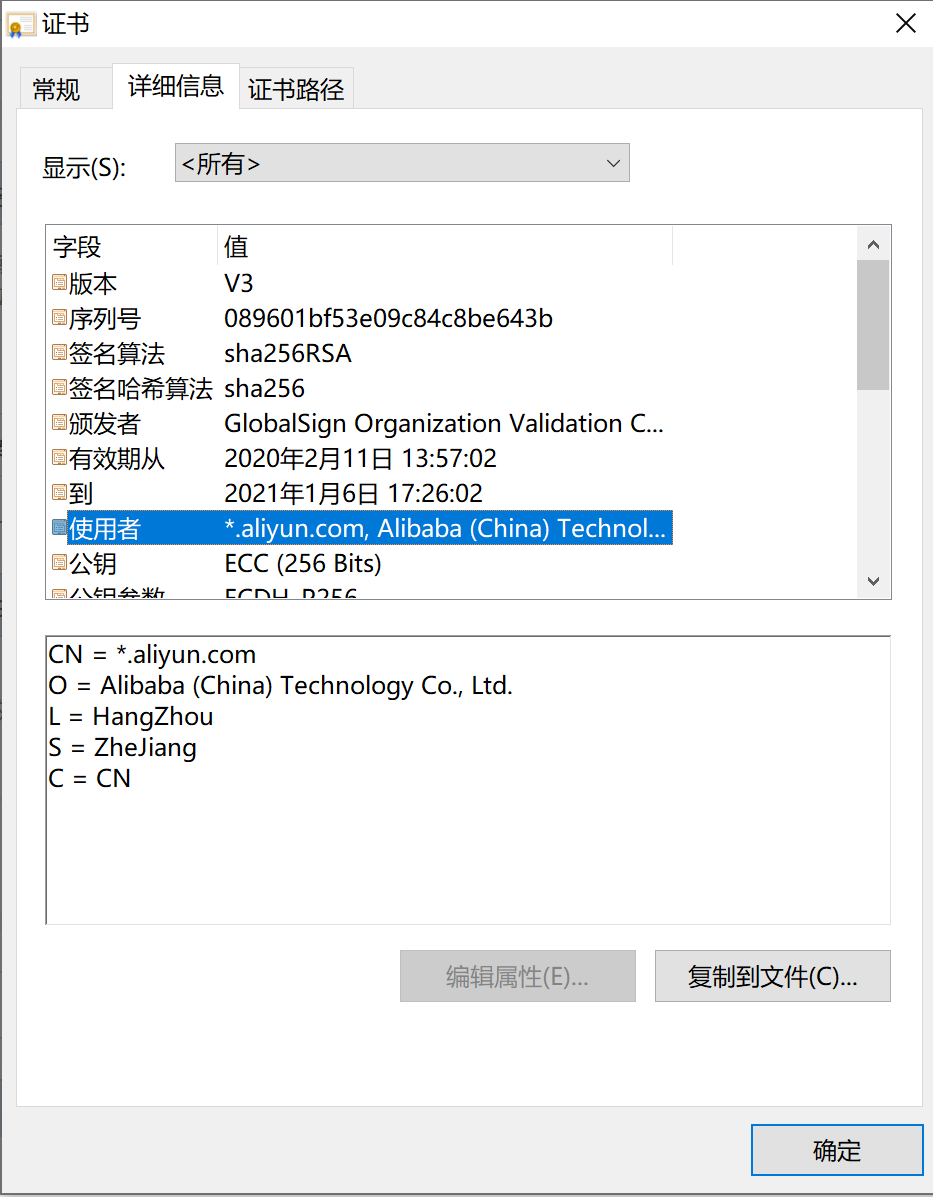
目前任意主流浏览器,地址栏前方有个类似于锁的标识,点击后可以直接查看当前网站的证书信息,例如:

证书.png

可以看到 CA 机构、起止时间、申请机构等关键信息,是一张 EV 型的通配符证书。

相比之下,DV 型证书提供的信息就不包括申请机构,你可以直接查看本站证书对比。

选择证书

DV 和 OV (EV) 的主要区别在于是否验证现实身份。有意思的是,域名服务商也会记录购买者的一些身份信息,例如注册邮箱、地址,虽然购买者也可以要求域名服务商隐藏这些信息,又或者有些域名服务商会直接显示服务商自己的信息,这也可以作为间接信源。因此,只有涉及直接利益相关、或者意义重大的域名,才有 OV (EV) 验证的必要。

域名类型首选通配符域名。除非确实只有开设确定的、有限个数服务的必要。多域名证书会对性能造成一定影响,单独为每个服务申请不同的证书,管理上又比较麻烦,前期管理维护的成本可能会稍微多一些,尤其是对于中小企业及个人开发者而言。

简单来讲,DV 通配符证书是适用范围最广的一种。

管理证书

CA 交互

这里申请的是 Let’s Encrypt 的免费 CA 机构。你需要向 CA 证明你拥有该域名的所有权,简单来讲就是证明你可以控制该域名的解析。目前一共有两种方式:基于 Web 服务,将某指定子域名指向某指定资源;基于 DNS,直接解析某子域名为某指定 DNS 记录。我这里要申请的通配符域名只支持 DNS 验证。国外有很多云服务提供商支持直接托管验证,遗憾的是,国内云服务商普遍不支持。所幸整个流程并不复杂:

首先要发送验证请求:本地生成一对 SHA-256 密钥,请求包中包含公钥以及需要验证的域名,返回具体要求的验证方式;

然后在域名服务商处按要求修改对应的地址解析,一般是添加某 TXT 记录;

随后 CA 进行验证,到此域名的所有权已验证完毕,这对密钥可以保留 30 日。

之后就可以正式申请证书。每一张证书还需要单独的一对密钥进行验证,将通配符域名先经过这对密钥的私钥加密,再将整个信息使用前面域名验证的私钥加密,向 CA 发送以申请证书。CA 通过公钥验证后,再用 CA 自己的签发私钥加密后回传。

LE 官方推荐使用 Certbot 进行证书管理,然而其自动化程度有限,DNS 验证部分,要完全自动化的话,需要自己根据相应的域名服务商提供的 API 编写对应的脚本。虽然已经有人写出了一些脚本,但是不都是基于 Shell 的,用起来还是多多少少有些不便。这里更推荐使用 acme.sh。

  • 安装:
1
curl  https://get.acme.sh | sh
  • 签发:
1
2
3
export Ali_Key="udontknow"
export Ali_Secret="either"
acme.sh --issue --dns dns_ali -d example.com -d *.example.com

这是基于阿里云的一张通配符证书,其他服务商可以参考这里对应修改。

在安装 acme.sh 时已经加入了 Cron 服务,签发后会定期续期证书,不再需要手动跑命令。

这里可以直接修改 ~/.acme.sh/account.conf 的相应密钥对,当然更推荐整个服务全部 Docker 化,毕竟改 Cron 和随便暴露全局变量对于洁癖来说还是很难忍受的。

配置证书

目前主流后端语言都可以直接以 HTTPS 方式启动,在程序内直接载入 SSL 证书。这样会带来一些运维上的问题,不利于统一维护管理。从运维方便的角度来讲,最好是将证书统一配置在负载均衡层,反代转发时统一使用证书。这里给出一个 Nginx 下的参考样例:

1
2
3
4
5
6
7
8
9
10
11
12
13
14
15
if ($host ~* "^(.*?)\.test3207\.com$") {
set $domain $1;
}
location / {
if ($domain ~* "blogs") {
proxy_pass http://192.168.1.109:6666;
}
if ($domain ~* "disk") {
proxy_pass http://192.168.1.121:6666;
}
proxy_pass http://127.0.0.1:8080;
}
listen 443 ssl;
ssl_certificate /path/to/fullchain.pem;
ssl_certificate_key /path/to/privkey.pem;

证书签发完后,一般是保存在 ~/.acme.sh/ 文件夹内,acme.sh 官方建议不直接使用该目录,以防后续目录结构更改,而使用

1
2
3
4
acme.sh  --installcert  -d  test3207.com   \
--key-file /path/to/privkey.pem \
--fullchain-file /path/to/fullchain.pem \
--reloadcmd ""

这样的形式,手动将证书复制到指定文件夹内。

如果是直接在主机上运行的话,--reloadcmd 参数可以直接填入 nginx -s reload,签发或续期完成后,会直接运行该命令进行重启。

如果是通过 Docker 的话,只将证书复制到 Volume 内,reload 在主机,容器内不填参数。主机定时重启 Nginx。

后话

最终效果是,只要不换服务器和域名,这套东西能用到 LE 不想干了为止。也正因为这样,整套流程因为用的次数太少有可能忘。写下此文以供参考。

另外,硬要讲的话,还需要考虑 LE 方访问 API 频率问题,以及吊销证书问题。实际上很难遇到这种情况。如有需要建议进一步参考 LE 官方文档

更新说明(2025)

  • 目前 Let’s Encrypt 已经非常成熟稳定,acme.sh 默认已切换至 ZeroSSL。本文所述流程仍然适用,建议结合文首更新说明使用;
  • EV 证书的浏览器 UI 特殊标识已在 2019 年后被主流浏览器取消,DV 证书已足够大多数场景使用;
  • 国内主流云服务商(阿里云、腾讯云、华为云等)目前均已支持 DNS API 自动验证;
  • ACME 协议实际使用 RSA 或 ECDSA 密钥对(推荐 ECDSA),SHA-256 用于签名验证;

简介

项目地址:https://github.com/test3207/learnPythonInOneDay

入门篇只讲基础,Web 开发、爬虫、数据库统一不涉及。阅读本文建议至少具备大学通识 C 语言基础。

主要内容包括:

变量与数据类型;常用系统关键字;函数;

常用内建函数和特性;面向对象;错误处理;

模块;I/O;常用内建模块;常用第三方模块。

每个部分都写成一个 Python 脚本,说明见注释。

关于安装:建议使用 Windows 10,安装包(3.8.1)可点这里下载,一路下一步,记得勾选”Add to PATH”选项,然后重启即可。如果链接失效,请在官网手动查找。

Update (2025): Python 3.8 已于 2024 年 10 月停止维护。建议使用 Python 3.11 或更高版本。请访问 Python 官网 下载最新版本。

未完成部分

常用内建函数和特性、常用内建模块、常用第三方模块等内容较为繁琐或暂时用不到,限于时间和精力,这些内容尚未全部完成,后续有空再补充。

简介

迫于年纪大了,记不住了,只好新安排了这么一款密码管理软件 Bitwarden

我看中的原因主要有这么几点:

首先要保证安全,代码开源 + 可以自建;目前来讲也不会把很重要的密码放在上面,自建 + 锁出口端口 + 必要出口端口监控先观察一段时间;

然后管理方便,Chrome 直接有插件,PC、手机也有对应的客户端,能做到自动填充而不需要手动复制粘贴;

然后也支持密码本体的一些有用的功能,比如按条件生成密码,以及支持上传文件(密钥);

自建

原版用了 C# + MSSQL,系统占用较高,有人用 Rust 重构了一份,rs 版本身也是开源的。目前用这个版本有一些地方和原版不一样,不过无关紧要。rs 版跑闲置状态下 CPU 占用基本为 0,内存占用 25MB 左右。

Docker 下两行命令解决:

1
2
docker pull vaultwarden/server:latest
docker run -d --name bitwarden -v /bw-data/:/data/ -p 80:80 vaultwarden/server:latest

端口号自行替换。

因为原版里要求手动指定证书,rs 版也提供了比较详细的证书配置指引。我本来以为程序对证书有什么方面的需要,但是研究了一下发现没有必要,证书仍然是可以统一配置在 Nginx 层的,对内端口不用改配置。

使用

你可以使用官方的版本,不过免费版的有一些限制;

也可以按上述说明自建,rs 版本的注册直接就是高级会员,听说官方的 Docker 不是,搞不清楚,反正官方的我没用;提示:官方的安装流程中,会下载 Shell 脚本,每一步生成的脚本里,curl 统统都要单独加 -L 选项,不然是跑不通的,原因在于指定的链接重定向了;

首次使用先通过自建的网页版注册账号,设置主密码。然后下载各端软件使用。

Chrome 直接搜插件就好了,PC 版即使搭了梯子也可能会出现网络问题,我这里是通过 Windows Store 下载的,Android 在 Google Play 也有。

各端的 UI 基本一致,都是左上角设置服务地址(也就是自建时暴露的地址),输入主密码登录即可。软件本身自带中文,细节自行探索。

更新说明(2025):文中提到的 bitwarden_rs 项目已更名为 Vaultwarden,Docker 镜像也已更换为 vaultwarden/server。截至 2025 年,Vaultwarden 仍在活跃维护,官方 Bitwarden 性能也已大幅优化。建议使用最新版本并启用两步验证以提升安全性。

简介

低成本的 CD,可以自建 Gitea + Drone,服务器最便宜每年要花 300 块(构建速度就不要太奢求了)。不过既然 GitHub 现在可以建私有仓库了,又有阿里免费的构建机,这么一配合,白嫖还是挺香的。

阿里的容器镜像服务可以对接阿里自己的 Code、GitHub、GitLab 和 Bitbucket。

这套东西还是有一些小问题:

比如项目名称包含大写会无法触发自动构建,虽然是不值得提倡的行为,但是工单硬说是 feature 也是有些无奈;

比如构建机偶尔会不稳定,也没有个什么探活或者通知机制,我记得 8 月份好像有 2 天这样,只能临时本机构建发版;

比如网络问题,拉包拉不动,一个 demo 级的项目也要 5 分钟,这个开发自己优化也不是不行,但是果然还是有些不爽;

当然整体上来讲还是挺不错的,对接配置都算是挺方便的,速度也还行。

GitHub 是通过 OAuth 授权获取项目权限的,我本来想全部做成一个包自动化来着,这里就只能手动了。

步骤

绑定代码源

登录阿里云,进入阿里云控制台,搜索容器镜像服务,第一次进入时需要手动开通,这个是免费的。找不到登录后直接点这里。这里可能会要求你设置一个密码,在拉取镜像时需要用到。

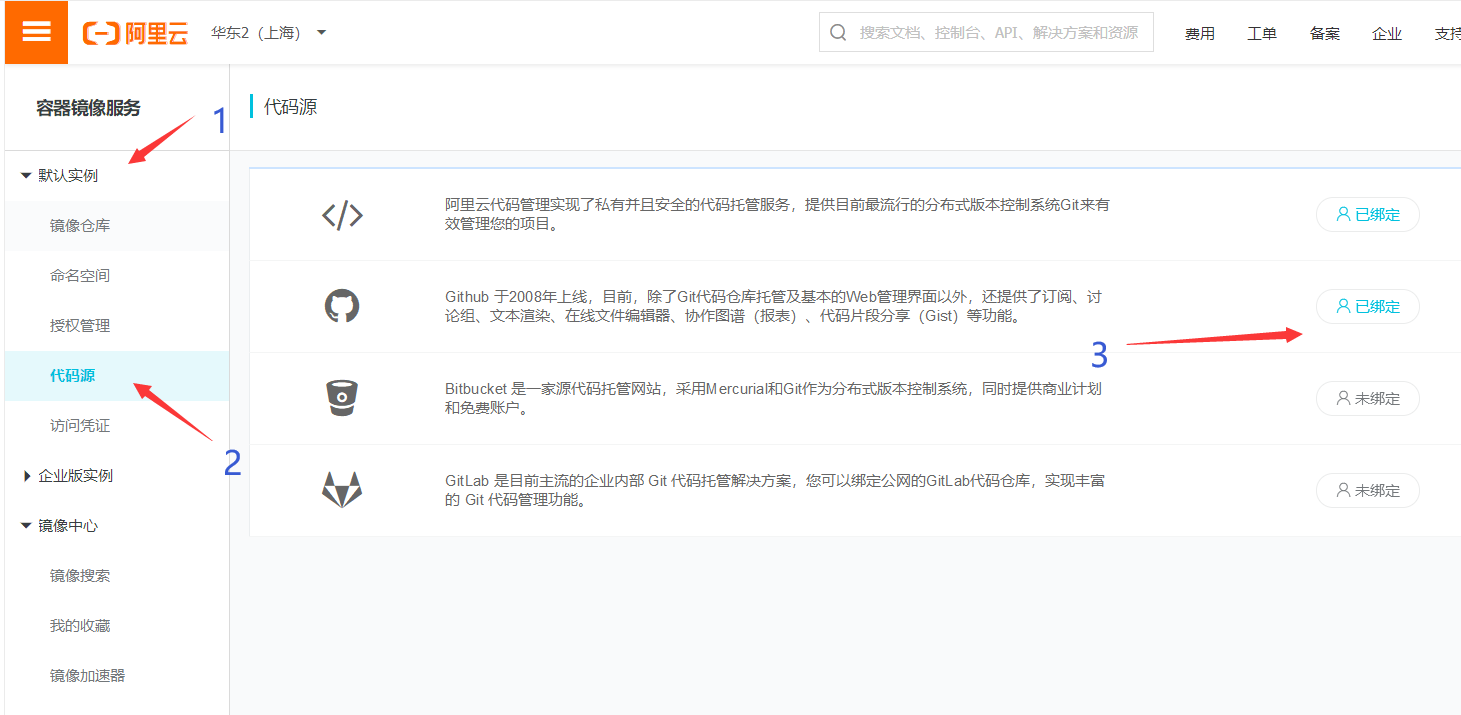
通过左边的菜单,默认实例 - 代码源,根据你要用的 Git 平台自行绑定,这里我选的是 GitHub。如下图所示:

cr-bind.png

创建命名空间

类似于 Git 的命名空间,自己的项目地址都带有自己的命名空间(GitHub 就是自己的 ID),作为和其他人区分的标识。这里最多可以创建 5 个命名空间。

点击:默认实例 - 命名空间 - 创建命名空间。这里就直接写自己的 ID,不容易冲突。

准备源仓库

这里我就简单写一个示例 demo,包括 Dockerfile 也要自己准备好的。仓库本身是可以设置为私有的,为了方便不熟悉 Docker 的同学我设置了公开。

另外 GitHub 的私有仓库免费版只支持 3 人以内的协作者,如果有更多人协作的需求,建议使用阿里自己的 Code 作为代码源。

非常重要:建议把上面 fork 来的 demo 里面,index.js 文件全局搜索 test3207,并全部替换为你自己的 ID,后续有用到。

创建镜像仓库

点击:默认实例 - 镜像仓库 - 创建镜像仓库。经过刚才的步骤,这里要填的信息都有了,自行填写。同样镜像仓库可以设置为私有。

配置构建信息

点击仓库名称或管理,进入配置页面。

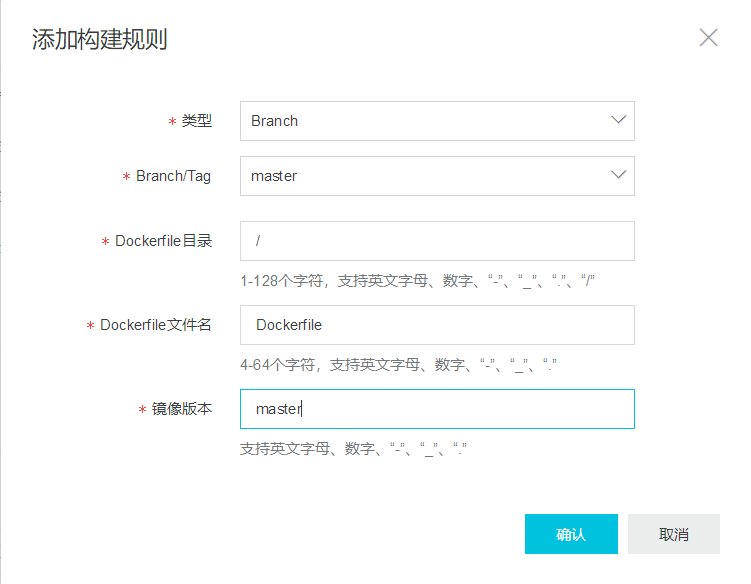
点击构建 - 添加规则,这里看得懂就自己填,看不懂就照着下面填:

cr-build.png

到这里自动构建的部分就完成了,你可以尝试修改 demo 文件,将 hello world 改成 hello 别的什么东西,再使用 Git 提交你的改动。在这个页面刷新一下,你就可以在下方构建日志里找到正在进行构建的过程了。

等构建完成后,依照基本信息的提示,在本地执行

1
docker pull registry.cn-shanghai.aliyuncs.com/{your namespace}/ali-cr-demo:master

就能获取到构建完成后的镜像了,你可以通过

1
docker run --name ali-cr-demo -p 7023:4396 --restart always -d registry.cn-shanghai.aliyuncs.com/{your namespace}/ali-cr-demo:master

来运行这个镜像,并访问本地 4396 端口看到 “Hello World”。

请注意上面两个命令中的 {your namespace} 都要替换成你自己的 namespace!

配置推送信息

配置推送信息只支持公网域名或者公网 IP,本质上就是阿里服务器向你提供的地址发起请求,因此 192.168.1.1、127.0.0.1 这类的本地 IP 是完全用不了的。如果你没有公网 IP 或者服务器,可以考虑购买云服务器:AWS 提供一年免费试用(配置过程较繁琐),学生可以通过学生认证在阿里云和腾讯云获得优惠价格。

再次提醒:上面要求 fork 来的 demo,全局替换 test3207 为你自己的 ID,虽然刚才有说。如果你不做的话,就无法继续下去了。

这个 demo 不仅作为 Hello World 的展示,也提供接收器的功能,在服务器上拉取 fork 并替换过 ID 的 demo,并通过 PM2 运行。当然 demo 里的接收方案比较粗糙,你也可以接入其他的 CD 服务,本质上这就是一个 HTTP 服务。

点击触发器 - 创建。这里名称随意写,触发器 URL 填写为:https://{ip}:7023/cr,注意这里的 IP 替换为你自己的域名或者 IP。选择 Tag 触发 - master。

到这里一个简单的 CD 流程就搭建完成了。最终的效果是,在本地做修改,git push 后,阿里自动构建镜像,完成后推送消息到服务器,服务器拉取新镜像并重新部署。

更新说明(2025):由于国内网络环境下 Docker Hub 和 GitHub Container Registry 访问受限,阿里云镜像服务提供国内 CDN 加速。GitHub 私有仓库协作者限制已放宽。

0%